Short answer
Ask your connected AI assistant to draw a sheet to check it, then export the project to a folder as one PDF per borehole or a single combined PDF. It needs GeoEQ SPT Logs 1.3 or later with Connect AI set up; exporting works with writing switched off.
Steps
- 01
Check Connect AI is set up
Follow the Connect AI tutorial first if you have not. Exporting does not change any project, so it works with Allow the AI to create and correct boreholes left off.
- 02
Ask the assistant to draw a sheet
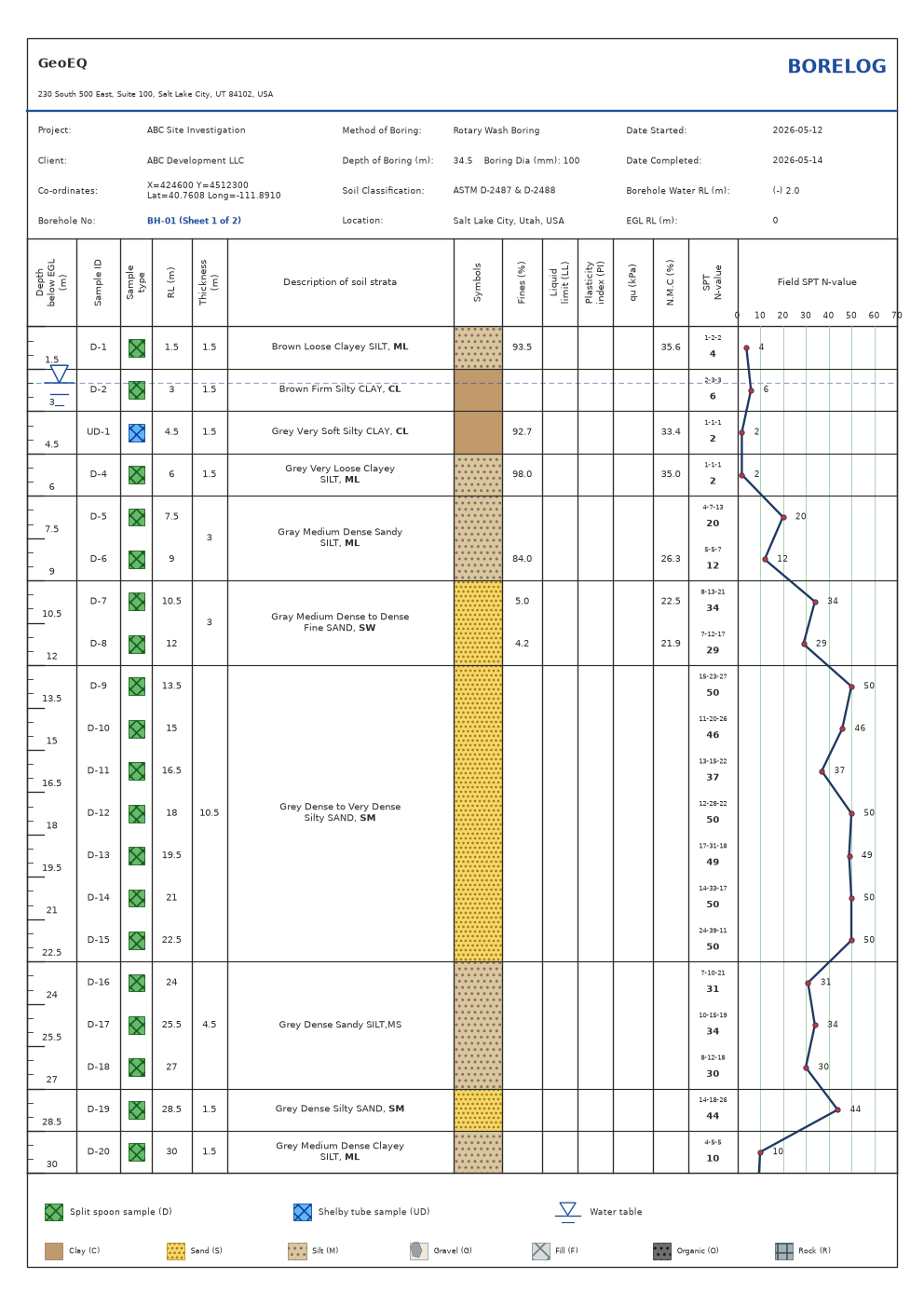
Say: "Draw sheet 1 of BH-03 from E:\projects\site.sbl." The assistant calls the render tool, which draws the sheet as an image exactly as the app prints it. Check depths, descriptions, N-values, core recovery and the header. You can ask for a higher resolution to read small print. A borehole deeper than one sheet has several, so ask for sheet 2 and onward by number.
- 03
Ask for a check before you export
Ask: "Check the project for data problems first." The assistant calls validate. The export tool also reports how many of the exported boreholes still have issues, noting that a row it could not read is missing from its sheet, but it is better to know before you deliver.
- 04
Export to a folder
Say: "Export every borehole in E:\projects\site.sbl to E:\deliverables\site-logs, one PDF per borehole." The assistant calls export with the folder. Files are named like BH-03 borelog.pdf. For a single file, ask for combine, which produces one PDF named after the project. The tool returns file names and page counts, not the PDFs.
- 05
Continue until every batch is done
A project is exported a batch at a time, 25 boreholes by default and up to 100. When more remain, the result gives a next_offset and the assistant repeats the call from there. Ask it to carry on until the total is reached and then tell you how many boreholes and pages were exported.
- 06
Open the PDFs and check them
Open a few files from the folder. They use the same drawing code as the app, so the layout matches. Check the header, the company details and the last sheet of a deep borehole. If a file already exists in the folder, the export stops without writing anything. Choose another folder, or tell the assistant to overwrite.
When to use AI and when to do it by hand
Use the assistant to export many boreholes in batches, or to preview several sheets without opening each one. For a single project you are already looking at, the Export PDF button in the app is faster; see the manual PDF export tutorial. This tutorial needs GeoEQ SPT Logs 1.3 or later; the manual route works in version 1.2.
What to check before you approve
- The folder path. Files are created there, so read the path before you accept the call.
- The count: boreholes exported, pages and total boreholes, against what you expect.
- Any boreholes with issues. Exported sheets show only data the app could read.
- A sample of the finished PDFs, opened in a PDF viewer.
PDFs you issue are signed by you, not by the assistant.
Common problems
Nothing was written because files exist. Choose a new folder or ask for overwrite.
The folder does not exist. Only the last folder is created. Its parent must already exist.
The borehole is found in two projects. Say which project to use.
The sheet you asked to draw does not exist. The render tool refuses a sheet number beyond the borehole’s last sheet. Ask the assistant to list the borehole with read to see how many sheets it has.
What to do next
Keep the PDFs with the project. If you change a borehole later, validate it again and export again to a new folder.
Frequently asked questions
Does the assistant see the PDFs?
No. The export tool writes the files to your folder and returns only their names and page counts. Use the render tool if you want the assistant to look at a sheet.
Will it overwrite my earlier PDFs?
Not unless you ask. If any target file already exists, nothing is written and the message lists the clashing names.
Can I export one borehole only?
Yes. Name the borehole and the tool exports just that one, with all its sheets in one PDF.