Short answer
RQD is the sum of intact core pieces 100 mm or longer divided by the core run length, times 100 (ASTM D6032). In GeoEQ SPT Logs, enter each run's top, bottom, TCR, SCR and RQD in the Rock core tab and the sheet draws one colour-coded recovery bar per run.
Steps
- 01
Measure the core run and its pieces
Lay out the core from one run and note the run length. TCR counts everything recovered, SCR counts full-diameter solid cylinders only, and RQD counts sound pieces 100 mm or longer.
- 02
Calculate RQD for the run
Add the lengths of all intact pieces 100 mm or longer, divide by the run length and multiply by 100. In a 1.50 m run with pieces of 320, 250, 180 and 140 mm, RQD is 890 / 1500 x 100 = 59 percent, which is Fair.
- 03
Open the Rock core tab
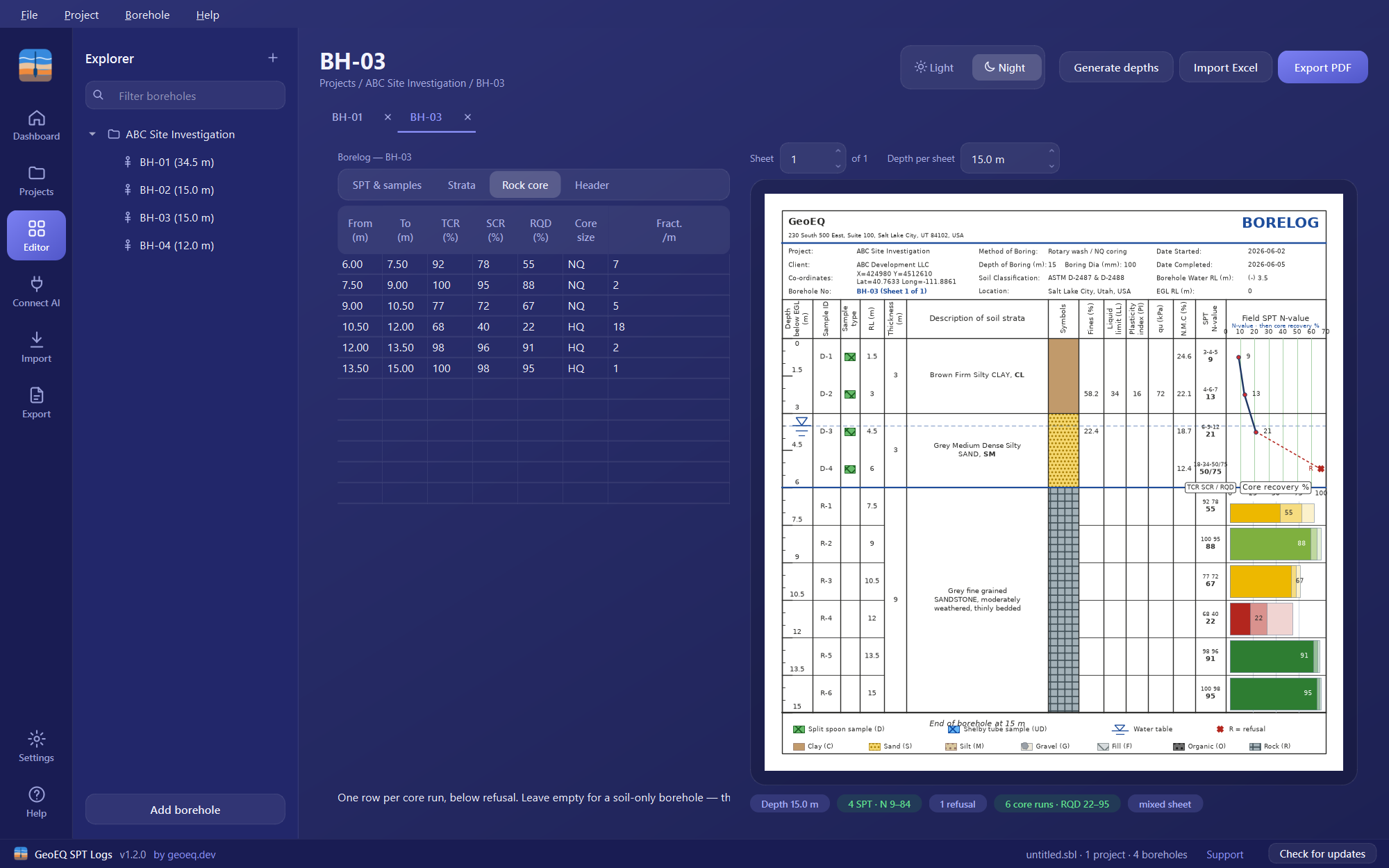
Double-click the borehole and choose the Rock core tab. It takes one row per core run, below refusal. Leave the tab empty for a soil-only borehole and the sheet is drawn as an ordinary borelog.
- 04
Enter each run
Type the run top and bottom, TCR %, SCR %, RQD %, core size (NQ, HQ and so on) and fractures per metre. Run number, run length and the rock quality word are worked out for you.
- 05
Read the recovery bar on the sheet
Each run is drawn as one bar: the palest block is TCR, the middle block SCR and the solid block RQD, with the RQD figure printed in the bar. The colour gives the rock quality, from red for very poor to green for excellent.
- 06
Check the badges under the sheet
Look at the badges for data problems. RQD cannot exceed SCR, and SCR cannot exceed TCR, so an out-of-order figure is reported as a probable typing error, as are a run bottom above its top, a run that starts above the end of the previous one, and values outside 0 to 100.
Before you start
When the split-spoon sampler refuses, the driller switches to a core barrel. Below that depth there are no blow counts, and the unit of measurement is the core run. Enter the soil part of the borehole first on the SPT & samples and Strata tabs, with soil type letter R for the rock stratum.
The sheet follows the data. With SPT rows and core runs, you get the N-value graph above the rockhead and core recovery below it. With core runs only, you get a rock sheet. The rockhead is the top of your first core run, so there is no setting to change.
RQD definition and worked example
RQD (rock quality designation) is the sum of intact core pieces 100 mm or longer, divided by the core run length, multiplied by 100 (ASTM D6032).
Example for a 1.50 m run (1500 mm): sound pieces of 320, 250, 180 and 140 mm total 890 mm. Shorter fragments are ignored. RQD = 890 / 1500 x 100 = 59 percent, so the rock is Fair. If the pieces of 100 mm or more added up to 1350 mm, RQD would be 90 percent, the lower limit of Excellent.
Common problems
An out-of-order figure is flagged. RQD above SCR, or SCR above TCR, is reported rather than silently corrected. Recheck the field sheet for a transposed value.
Runs do not line up. A run that starts above the end of the previous one is reported. Check the run top and bottom depths.
What to do next
Export the borehole to PDF to see the recovery bars on the printed sheet, or read the glossary entry on RQD for the rock quality bands.
Frequently asked questions
How do you calculate RQD?
Sum the lengths of intact core pieces that are 100 mm (4 in.) or longer, divide by the total length of the core run and multiply by 100 (ASTM D6032). Pieces shorter than 100 mm are not counted.
What is the difference between TCR, SCR and RQD?
TCR is total core recovery and includes rubble. SCR is solid core recovery and counts full-diameter solid cylinders only. RQD counts sound pieces 100 mm or longer. RQD can never exceed SCR, which can never exceed TCR.
What do RQD values mean?
GeoEQ SPT Logs uses these bands: 0 to 25 percent very poor, 25 to 50 poor, 50 to 75 fair, 75 to 90 good and 90 to 100 excellent.
Does GeoEQ SPT Logs calculate RQD from piece lengths?
No. You enter the TCR, SCR and RQD percentages for each run. The app derives the run number, run length and rock quality word, and checks that the percentages are consistent.