Documentation / Logging
Rock core, TCR, SCR and RQD logging in GeoEQ SPT Logs
Short answer
Enter one row per core run on the Rock core tab: top, bottom, TCR, SCR, RQD, core size and fractures per metre. The sheet follows the data with no setting to change, and each run is drawn as one recovery bar coloured by Deere's rock quality band.
- RQD ≤ SCR ≤ TCR
- checked on entry
- 100 mm
- minimum piece length counted in RQD (ASTM D6032)
- 5 bands
- very poor to excellent (Deere)
What is a core run?
When the sampler refuses, the driller pulls the split spoon and picks up a core barrel. Below that depth there are no blow counts. The unit of measurement is the core run, with three percentages measured off the recovered core.
| Figure | Counts | Name |
|---|---|---|
| TCR | Everything recovered, rubble included | Total core recovery |
| SCR | Full-diameter solid cylinders only | Solid core recovery |
| RQD | Sound pieces 100 mm or longer | Rock quality designation |
RQD is defined in ASTM D6032. For the definitions, see the glossary entries for RQD, core recovery and SCR.
How do I enter core runs?
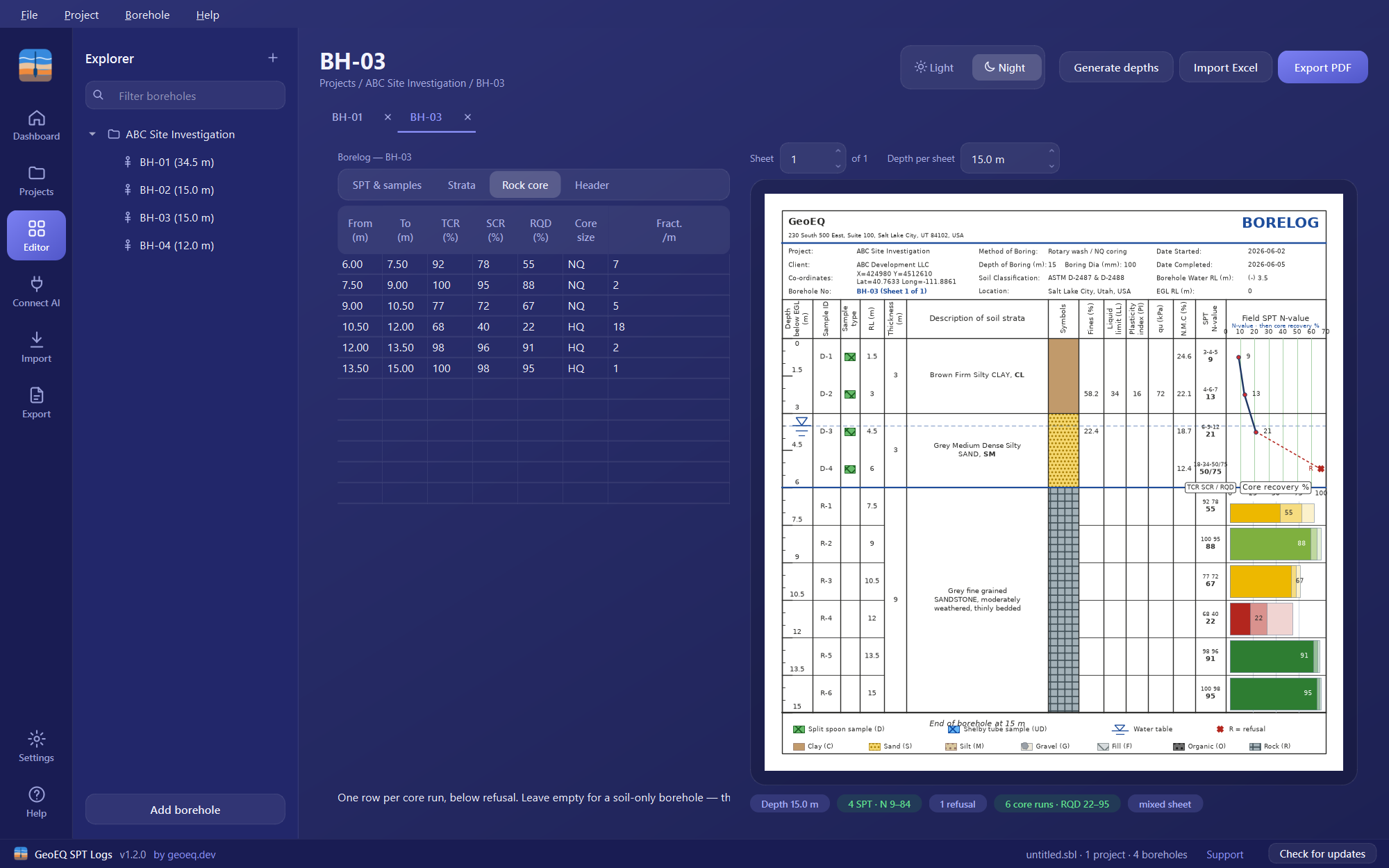
Open the Rock core tab and add one row per run, below refusal: From and To depth, TCR %, SCR %, RQD %, Core size (NQ, HQ and so on) and Fract. /m (fractures per metre). Run number, run length and the rock quality word are worked out for you. Leave the tab empty for a soil-only borehole.
How does the sheet follow the data?
| SPT rows | Core runs | Sheet |
|---|---|---|
| Yes | None | The ordinary borelog, unchanged |
| Yes | Yes | N-value graph above the rockhead, core recovery below it |
| None | Yes | A rock sheet, with the lab columns carrying the run figures |
The rockhead is the top of your first core run, so the transition line needs no setting. A borehole with no core runs is drawn exactly as version 1.1 drew it. A badge under the sheet names the result, such as “mixed sheet”.
On a rock sheet the lab columns are relabelled Run no., Core size, TCR, SCR, RQD, Run length and Fractures per metre. On a cored borehole with no SPT tests, the depth ruler follows the core run length, so ticks land on run boundaries.
How do I read the recovery bar?
RQD cannot exceed SCR, which cannot exceed TCR, so one nested bar shows all three: the palest block is TCR, the middle SCR, and the solid block RQD. The RQD figure is printed in the bar. The whole bar takes the colour of the run’s rock quality, so a weathered zone shows before you read a number.
| RQD % | Rock quality | Colour |
|---|---|---|
| 0 to 25 | Very poor | Red |
| 25 to 50 | Poor | Orange |
| 50 to 75 | Fair | Yellow |
| 75 to 90 | Good | Light green |
| 90 to 100 | Excellent | Green |
The bands follow Deere. A value exactly on a boundary falls in the higher band, so RQD 90 is Excellent. The colours differ in lightness as well as hue, so the scale still reads on a photocopy.
Which checks run on rock core data?
Because the three figures nest, a figure out of order is a typing error. The app reports it and does not correct it. It also reports a run bottom above its top, a run that starts above the end of the previous one, and any value outside 0 to 100. Look at the badges under the sheet.
For a worked RQD example, follow how to log rock core: run, recovery and RQD. Rock core runs are also totalled on the Dashboard in version 1.3.
Step-by-step tutorials
Frequently asked questions
What is the difference between TCR, SCR and RQD?
TCR is total core recovery and includes rubble. SCR is solid core recovery and counts full-diameter solid cylinders only. RQD counts sound pieces 100 mm or longer (ASTM D6032). RQD can never exceed SCR, which can never exceed TCR.
Do I have to switch the sheet to rock mode?
No. There is no rock or soil setting. What you enter decides what is drawn, and the rockhead is the top of your first core run.
Does the app calculate RQD from piece lengths?
No. You enter the TCR, SCR and RQD percentages for each run. The app derives the run number, run length and rock quality word, and checks the figures against each other.
What happens if I type SCR higher than TCR?
The figure is reported, not silently corrected. A badge under the sheet flags it as a typing error, as it does for a run bottom above its top, a run that starts above the end of the previous one, and any value outside 0 to 100.