Documentation / Logging
SPT blow counts, N-value and samples in GeoEQ SPT Logs
Short answer
On the SPT & samples tab, enter one row per test: depth, the three 15 cm blow counts, sample ID, type (D or UD) and lab results. N is computed as the 2nd plus 3rd blow count, as in ASTM D1586. Type a refusal such as 50/75 straight into an increment cell.
- N = 2nd + 3rd
- 15 cm increments (ASTM D1586)
- 50/75
- refusal: 50 blows for 75 mm
- D / UD
- split spoon / Shelby tube
What does the SPT & samples tab hold?
Double-click a borehole to open its borelog. The SPT & samples tab takes one row per test or sample, and the sheet beside it redraws with every edit.
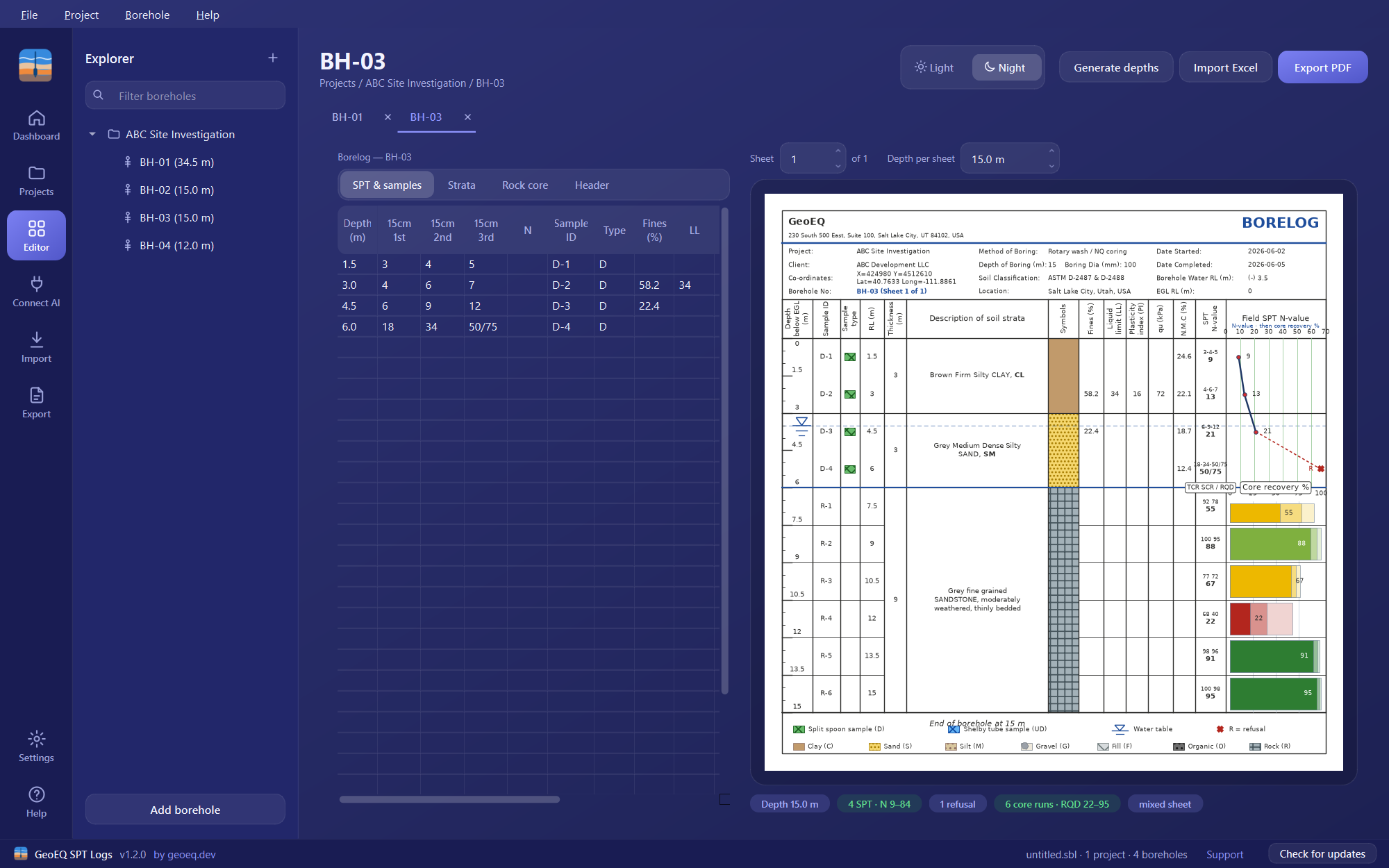
| Column | What to enter |
|---|---|
| Depth | Test or sample depth, in the project’s units |
| 15cm 1st, 2nd, 3rd | The three 15 cm blow counts, or a refusal such as 50/75 |
| N | Optional. A direct N-value; blank means N is the 2nd plus 3rd |
| Sample ID | For example D-1 |
| Type | D or UD |
| Fines (%), LL, PI, qu, w (%) | Lab results; qu is in kPa, or tsf in an imperial project |
How is N calculated?
N is the sum of the 2nd and 3rd 15 cm blow counts. The first 15 cm is a seating drive and is not counted (ASTM D1586). Where blow counts are unknown, type N directly into the N column and it takes precedence over the computed value. A file with only an N column imports the same way.
The sheet plots the field N-value. For corrections to N60, see the glossary entry on N60 and the note on SPT N-value corrections. The term itself is defined under SPT.
How do I record refusal?
Type the notation straight into the increment cell. 50/75 means 50 blows for 75 mm. The sheet then:
- prints the blows as
8-15-50/75; - shows the notation in the N column instead of a number nobody measured;
- draws a solid line through measured points and a dashed connector to a refusal marker at full scale, with a legend entry.
Project settings decide how the notation reads in the N column: 50/75, >50, Ref or R. See project settings. Below refusal, rock coring continues on the Rock core tab.
What are the D and UD sample types?
D is a split-spoon sample and UD is a Shelby tube (undisturbed) sample, each with its own symbol in the sample column. When a D and a UD share one depth, the sheet shows a single merged row: the UD identity, with the SPT blows and the combined lab values.
LL and PI are the Atterberg limits; see the glossary.
How do I fill the depth column quickly?
Press Generate depths. It fills the depth column at the project’s test interval, from the first test depth down to the borehole depth, and leaves rows you have already typed alone. With the defaults (1.5 m interval, first depth 1.5 m) a 15 m borehole gets ten rows.
To bring many rows in at once, copy from Excel and paste into the table, or use the Excel and CSV import.
What if a value cannot be read?
A depth or blow count that cannot be read is reported in the badges under the sheet, for example “use a number, or 50/75 for refusal”, rather than being dropped silently. The sheet shows up to two such messages and then counts the rest.
With version 1.3 you can also ask an AI assistant to build a boring log from a field sheet.
Step-by-step tutorials
Frequently asked questions
How is N calculated in GeoEQ SPT Logs?
N is the 2nd plus the 3rd 15 cm blow count, following ASTM D1586, where the first increment is a seating drive. If you type a value into the N column it is used instead, which is useful when blow counts are unknown.
How do I enter refusal?
Type the driller's notation into the increment cell, for example 50/75 for 50 blows for 75 mm. The sheet prints 8-15-50/75 and the N column shows the notation instead of a number nobody measured.
Does the app calculate N60?
No. The sheet plots the field N-value as entered. Energy and other corrections such as N60 are applied separately, as explained in the glossary and the blog note on SPT N-value corrections.
Can I paste blow counts from Excel?
Yes. The tables accept Excel-style copy and paste. For a whole spreadsheet of boreholes, use the import described in the Excel and CSV import guide.